CEDET is a Collection of Emacs Development Environment Tools written with the end goal of creating an advanced development environment in Emacs. CEDET is hosted at Source Forge and is Free Software. You can view CEDET's CVS archive, project summary, and mailing lists at the CEDET Project page.
Why is CEDET needed?
Emacs already is a great environment for writing software, but there are additional areas that need improvement. Many new ideas for integrated environments have been developed in newer products, such as Microsoft's Visual environment, JBuilder, or Eclipse. CEDET is a project which implements several advanced features developers have come to expect from an Editor.
결론은 Emacs의 기능을 Eclipse나 비쥬얼 스튜디오 같은 개발툴의 경지까지 끌어올리겠다는 의미.
그럼 CEDET의 특징은?
 Projects
If you don't want CEDET to manage your Makefiles, CEDET will still be able to identify some types of projects based on pre-existing build configurations, such as the Emacs sources, the Linux kernel, or any project built using Automake.
The entire CEDET Makefile tree was built with CEDET's project management system, so when you download and build the distribution package, you will be using aCEDET project.
The image to the right shows a part of the Project management menu.
요약 : 비주얼 스튜디오의 프로젝트 처럼 전체를 알아서 make해주는 기능이 있다.
Smart Completion
 Write code with smart code completion, sometimes known as "Intellisense". The CEDET infrastructure for parsing and tagging files, and analyzing source code is one of the most accurate completion tools for C++ anywhere. It will correctly handle inheritance scoping rules, templates, smart-pointers, and automatically filters based on what the value will be assigned into.
Code completion is not restricted to just C or C++. The completion engine is generic and works for any language that has a robust tagging parser written for CEDET, and a thin adaptation layer for the language. See the language support page to see if your language is supported.
The image to the right shows smart completion configured to use a popup menu in a CEDET unit test source file going through a templated smart pointer.
요약 : 자동완성이 된다아~! ㅋ 이건 원래 이맥스도 되지만, 스마트한 건 내가 작성한 것들도 뜬다는것~
Smart Help/Jump
Smart help shows the prototype of the variable or method under point. As with the smart completion, it will correctly identify the method under point, deriving it's correct prototype by dereferencing the datatypes through templates and smart pointers.The smart jump feature is similar to the classic Emacs TAGS feature, except it always goes to the correct location. Using TAGS on a method name makes you scan through all the possible methods with the same name to find the one you want. Using the CEDET smart jump feature takes you to the right definition the first time.
요약 : 이맥스 TAGS보다 정확하게 그 위치로 이동할 수 있다.
Symbol References
 Analyze where symbols are referenced in your code base. The Symbol References tool in CEDET can use external tools such as GNU Global, ID Utils, CScope, or even find/grep to locate usages of your symbols. Every location is analyzed and displayed hierarchically showing you the file and function the reference occurs in, instead of a flat list of locations.
The image to the right shows integration with GNU Global running in the GNU Global source code.
요약 : 심볼 관리가 가능해진다. 디버깅이 더 쉬워지겠죠?
Code Generation
 Generate code with a powerful language-independent template system. The template system in CEDET is a framework designed for code-generating application developers. Even so, the base system and templates can also be used to insert small repetitive code blocks. The template language is straight-forward, and flexible. Because it uses the same code analytics as the Smart completion, it often can correctly guess a wide range of values to be used in your templates, saving you typing.
Some pre-existing tools that use CEDET's code generation system will write texinfo documentation for you, create doxygen style comments fully filled out from the local context, or insert get/set methods for variables in a class.
The image to the right shows a simple class declaration inserted into an empty buffer.
요약 : 코드를 템플릿에 맞게 자동생성 해준다. HTML5 같은 경우 유용할듯.
UML Diagrams
 Create UML diagrams either by hand, or automatically generate simple 3-tier class diagrams from your sources. The diagrams are linked to your source-code, so you can browse quickly through you code from the convenience of UML.
The image to the right shows CEDET's UML tool's source code, called 'COGRE', diagramming and browsing itself. Optional unicode character support is enabled for the special characters.
요약 : 내가 작성한 소스에 맞게 UML을 그려준다. 대박인데? ㅋ
Advanced Code Browsing
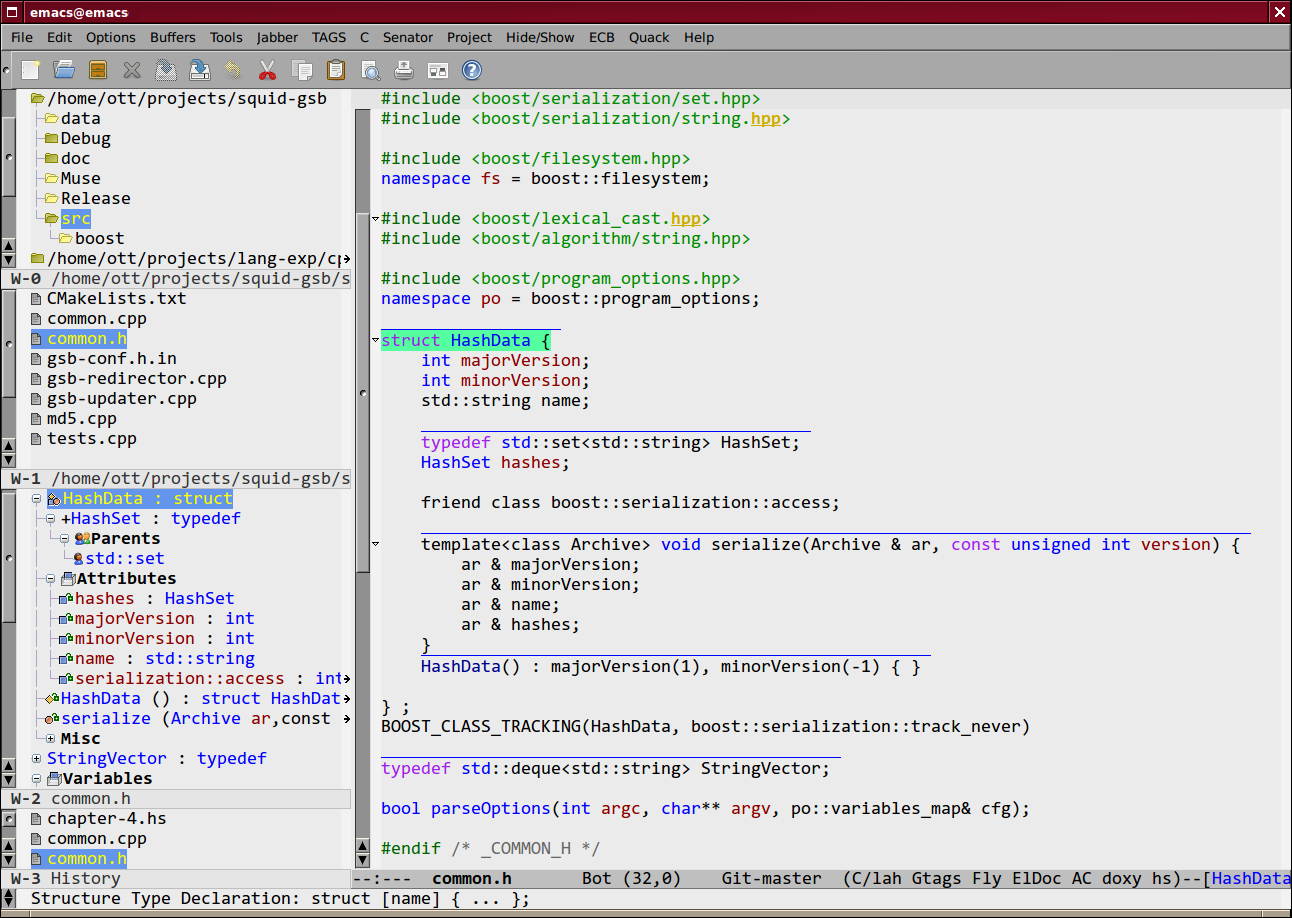
 With the CEDET parsing backend, advanced code browsing tools like ECB can be used. ECB, or the Emacs Code Browser provides an advanced set of UI windows docked to your Emacs frame. The extra windows provide a wide range of features, including:
- A list of functions, classes, and methods in the current file
- A code analyzer/completions list
- A current definition display
- A directory tree,
- A list of source files in the current directory,
- A history of recently visited files,
- and many others
요약 : ECB를 깔면 디렉토리 관리가 Visual하게 가능해진다. dired를 안써도 되는건 물론이고, 클래스와 메소드도 깔끔하게~! ㅋ

댓글 없음:
댓글 쓰기